
In-Depth Interviews at the Scale of Surveys
User Intuition runs in-depth interviews at survey scale, laddering 5-7 levels deep on your guide, with required questions pinned and probing set by you. From $150/study with your own sample; 200+ panel interviews in 24 hours.

Walk me through the last time you made this choice. What tipped it?
The deciding reason surfaced four follow-ups deep, not in the first answer.
Trusted by teams at






An in-depth interview (IDI) is a one-on-one qualitative research conversation that probes deep into reasoning, identity, and emotional drivers — the depth surveys miss and human moderators run too few of. User Intuition runs in-depth interviews at scale, using an adaptive AI moderator that follows unexpected threads, allocates depth by business value, and gets smarter every study. Across 30,000+ in-depth interviews run on User Intuition, 98% of participants reported a satisfactory research experience even as the AI probed 5-7 levels deep into motivations, blockers, and decision criteria. That combination of depth and participant satisfaction is what makes scaled qualitative research possible — depth without fatigue, scale without methodological dilution. A User Intuition study starts at $150, returns evidence-traced findings from the panel in 24 hours, and is backed by 4.9/5 on G2 and 5/5 on Capterra. User Intuition delivers themed transcripts, evidence-traced findings, segment-level qualitative cuts, and Customer Intelligence Hub queries that replace focus groups and traditional IDIs.
What are AI-moderated in-depth interviews?
An in-depth interview (IDI) is a one-on-one qualitative conversation that probes 5–7 levels into the reasoning and emotion behind a decision. User Intuition runs IDIs with an adaptive AI moderator, so you get the depth of a senior researcher at the scale of a survey.
Who uses AI-moderated in-depth interviews?
Agencies and research teams that need qualitative depth across hundreds of participants, not a handful.
How do AI-moderated in-depth interviews work?
Upload your guide and set your study rules. The AI moderator runs 20–30 minute interviews in voice, video or chat, keeps required questions in your order, word for word if you lock them, follows unexpected threads, and ladders every answer.
What do you get from an AI-moderated IDI study?
200+ panel interviews in 24 hours, each with a transcript, recording and evidence-linked findings, plus an editable presentation.
Why have human-moderated in-depth interviews hit a ceiling?
Human moderation caps research at 4–6 interviews a day per researcher. Here's what researchers tell us, and how User Intuition removes each limit.
- Sound familiar?
We lose two weeks to calendar wrangling before the first interview even happens.
No scheduling needed
Participants join on their own time, on any device, in any timezone, so 200+ panel interviews finish in 24 hours.
- Sound familiar?
Interview #50 never gets the same rigor as interview #1.
The same rigor in every interview
Your guide runs as written on every conversation, with 5–7 levels of laddering and every follow-up visible in the transcript.
- Sound familiar?
Moderation is our bottleneck, and we can't hire senior moderators as fast as the studies come in.
No cap on moderation capacity
Hundreds of conversations run in parallel, around the clock and across time zones, and the last one gets the same attention as the first. Your senior researchers spend their hours on the guide, the analysis and the story, not on running sessions.
- Sound familiar?
At $1,500 an IDI, we can only afford a handful of projects a year.
Pay only for interviews that pass
Each AI-moderated interview costs a fraction of a moderated IDI. Every conversation is scored on length, depth and coverage, and only the ones that pass are charged.
From Research Question to Deep Insights in 4 Steps
Design your study, let the AI moderate, and get evidence-backed results, with panel studies back in 24 hours and your own sample interviewed in parallel.
Design Your Study
Define your research objectives, target audience, and methodology. Choose interview mode — voice, video, or chat. Bring your own guide, or our AI builds the discussion guide, screener, and timeline automatically.
AI Moderates Live Conversations
User Intuition conducts adaptive, one-on-one interviews with each participant — probing 5-7 levels deep using structured laddering methodology. It follows unexpected threads, adjusts tone to each participant, and never fatigues.
Real-Time Analysis and Synthesis
As interviews complete, findings are processed through a structured ontology — extracting emotions, motivations, competitive mentions, and jobs-to-be-done. Every theme is counted and traced to the participants who said it.
Access Insights in the Intelligence Hub
Every interview feeds your searchable Customer Intelligence Hub. Query findings in plain language, surface cross-study patterns, and build institutional memory that compounds with every conversation.
See how to set up and launch a complete AI-moderated research study in three steps.
- 0:00 Introduction
- 0:05 3-step setup overview
- 0:09 Step 1: Create your study
- 0:15 Step 2: Review your goals
- 0:30 Step 3: Set up your interview
- 0:39 Launch your study
Video transcript
User Intuition is the easiest, simplest and fastest way to get customer feedback at scale. Set up a study in three easy steps. First, describe the question you want answered. User Intuition turns that into a complete research study. Second, review your goals. In this example, we make sure that the study is aimed at the right research objectives including why scores are dropping, which customer moments matter most, and what the team needs to do to improve the next experience. Third, set up your interview experience. Choose your interviewer, the format, language, and set up your screener questions to ensure we're targeting the right audience. Then, launch. From there, we do the rest. We recruit, we interview, and uncover what's driving your metrics. All in less than 24 hours, for twenty dollars a conversation. Run your first study at userintuition.ai.
Three Modalities, One Adaptive AI Moderator
User Intuition runs in-depth interviews in voice, chat, or video customer interview modalities — you set the mode for each study. 98% participant satisfaction across every mode.
Voice Interviews
Natural phone-style conversations where participants speak freely. The AI listens, adapts, and probes deeper based on tone and content — capturing nuance that text can't.
Chat Interviews
Text-based conversations participants complete on any device, at any time, in any timezone. Ideal for mobile-first audiences and asynchronous research across geographies.
Video Customer Interviews
Face-to-face video conversations with consumer or B2B participants. Pairs naturally with visual stimulus (concept tests) and product walkthroughs (interactive walkthroughs) — both available as dedicated study types.
Four Dimensions of Adaptive Intelligence
Most AI interview tools follow scripted branching logic — predetermined paths with fixed follow-ups. User Intuition's AI moderator adapts on four dimensions simultaneously, delivering the depth of expert human moderation at the consistency and scale of automation.
The Four Adaptive Dimensions
- Conversationally adaptive: non-deterministic probing with structured laddering from surface answers down to root motivations, 5-7 levels deep
- Contextually adaptive: adjusts tone, language, and depth to each participant's demographics, role, and segment, with empathetic follow-up
- Value-adaptive: extra depth goes to the segments your brief prioritizes (SMB, Mid-Market, Enterprise, spend or strategic value), within the probing limits you set
- Hypothesis-adaptive: as hypotheses are confirmed, follow-up time shifts toward the open questions, within the guide and probing depth you set; required questions run in every interview
Built-In Quality Controls
- Your guide stays the spine: required questions stay pinned, and you decide how far the moderator probes
- Panelists vetted and tracked longitudinally across studies; every session screened for AI-generated or coached answers
- Attention and engagement monitoring throughout every interview
- Professional respondent filtering across all panel sources
- Evidence trails for every finding — cite the exact verbatim
- Methodology transparency: see why the AI asked each question
- GDPR & CCPA compliant; customer data is never used to train AI models
Methodology validated across 30,000+ AI-moderated interviews. Four dimensions of adaptive intelligence — not a chatbot with a questionnaire.
Apply AI Interviews to Any Research Challenge
See how teams use AI-moderated interviews across solutions.
Win-Loss Analysis
Uncover the real reasons deals are won or lost.
→Churn & Retention
Understand actual exit drivers by segment.
→UX Research
Test prototypes and capture emotional responses.
→Consumer Insights
Deep-dive into purchase motivations and brand perception.
→Concept Testing
Validate messaging and concepts with real customers.
→Shopper Insights
Map shopping missions and switching triggers.
→Why researchers choose User Intuition
User Intuition is an AI-moderated interview platform that gives research teams and agencies the depth of a senior researcher at the scale of a survey, with vetted respondents, your own methodology and evidence you can trace to the verbatim. Quality is built in: a person vets every panelist by hand, every session is screened for fraud, and you pay only for interviews that pass.
Senior-researcher depth
The moderator ladders 5–7 levels deep by default, using Reynolds and Gutman's laddering method, so you hear the reasons behind the reasons.
Your methodology, run as written
Bring your discussion guide and frameworks. Required questions stay pinned in order, word for word if you need it, study rules keep the moderator inside your compliance lines, screeners and hard quotas fill every cell to plan, and you decide how far it probes.
Every finding traces to its source
Click any theme through to the verbatim, the transcript and the recording. Every claim in the deliverable traces to what a participant said.
Respondents you can stand behind
A 4M+ vetted panel across 58 countries: a person listens to every panelist's interviews before they're accepted, then every session is screened for AI-generated or coached answers and panelists are tracked across studies. Or bring your own: customer lists, your panel provider, or respondents straight from your survey.
Deliverables ready to present
Themes, verbatims and an editable presentation for every study, plus every transcript, recording and screener answer to export into your own tools. Put your own brand on them when you need to.
Survey scale, quality-only billing
200+ panel interviews in 24 hours, with no cap on parallel conversations. Each one is scored on length, depth and coverage, and you pay only for those that pass.
- Isolated workspaces
- Confidential stimulus
- Never used to train AI models
- GDPR & CCPA compliant
- SOC 2 Type II examination underway
- Security →
AI-Moderated vs. Human-Moderated
vs. Online Surveys
Traditional research cost ranges cite Drive Research industry benchmarks (2026). User Intuition pricing is the current self-serve rate; subscription options are on /pricing/.
| Dimension | AI-Moderated (User Intuition) | Human-Moderated | Online Surveys |
|---|---|---|---|
| Depth per conversation | 5–7 levels of structured laddering | 3–5 levels (varies by moderator) | Surface-level only |
| Consistency | Identical methodology every time | Varies by moderator, fatigue, day | Fixed questions, no follow-up |
| Scale | Hundreds simultaneously | 4–6 per day per moderator | Thousands, but no depth |
| Time to insights | 24 hours for panel studies | 6–12 weeks | 1–2 weeks |
| Cost (20 participants) | $600 with your own sample | $15K–$75K per project | $500–$2,000 |
| Follow-up probing | Dynamic, adaptive in real-time | Depends on moderator skill | None — static questions |
| Participant experience | 98% participant satisfaction, any time/device | Scheduling friction, time-bound | Low engagement, high abandonment |
| Bias control | Same guide and probing rules on every interview; every follow-up visible in the transcript | Fatigue after 4–6 interviews/day | Question-order bias, satisficing |
| Adaptiveness | 4 dimensions — conversational, contextual, value, hypothesis | Depends on individual moderator skill and preparation | None — fixed questions, no adaptation |
Hear the interviews. See the presentation.
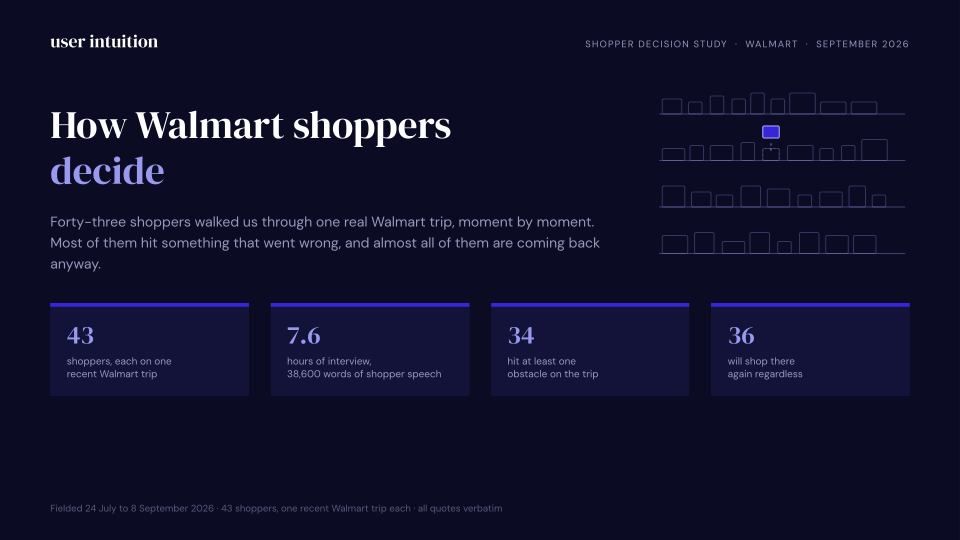
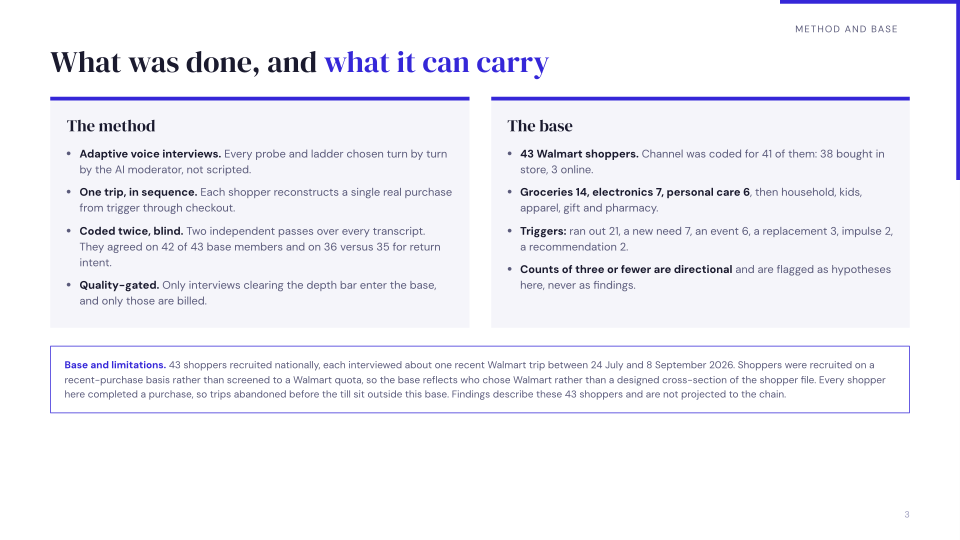
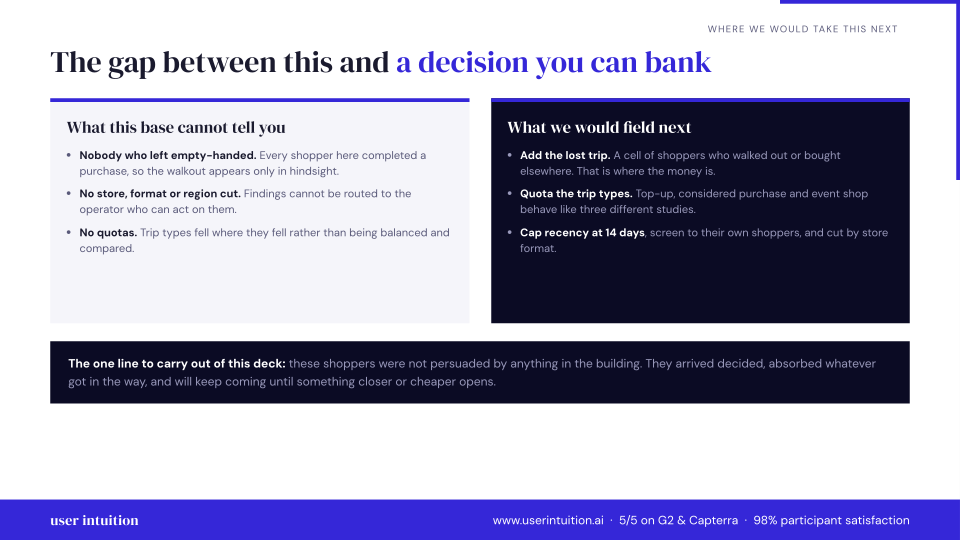
Explore calls and a sample presentation from our 43-participant Walmart shopper study.
Grocery top-up, supercenter
“Basically, because we use those things all a lot We try to always have you know, certain things in the house at all times because we use them very frequently. So we don't like to run out of them.”
What was making you want those specific things right then? Beyond just being out? Was it about being able to make certain meals or something else?
Basically, because we use those things all a lot We try to always have you know, certain things in the house at all times because we use them very frequently. So we don't like to run out of them.
Phone replacement, unplanned and urgent
“It made me feel so safe so relieved, and it brightened my day.”
Sounds like you knew exactly what you want. A Google Pixel 6 Pro. What was it about that phone that made it the right choice for you, especially in that moment?
Yeah. Thank you. So the the the phone had a lot of features. I I heard friends were talking about this phone. So in terms of the camera setting, it can take pictures and refine them into good quality. It has its own internal scanner, like I don't need to download other apps to scan to do scans. And of course, it has high quality for recording, which has been helping me in my meetings. In the office. So it's really amazing, and I love festival the quality of the phone in terms of the camera, because the previous phone I had was a Samsung. And the quality was really frustrating. And it had it has a very good processor speed as well. It's very fast. It's very efficient, and I like it. I like it. I'm enjoying the features.
Sample presentation
Preview three slides, or download the full 15-slide presentation.
Bring your own sample
$30 per quality voice interview
Use our 4M+ vetted panel
$60 per quality voice interview
What researchers say
"User Intuition gave us something we'd never had before — the ability to have hundreds of deep conversations with our consumers in days, not months, and actually use those insights to make decisions in real time. That's not incremental improvement. That's a fundamentally different way of building brands."
 Eric O., Chief Commercial Officer, Turning Point Brands
 "We learned that about a third of our users don't think setup is their job. It was kind of like a throwaway comment: one person said they'd just ask ops to do that part. The moderator followed up on who "ops" meant, why they would hand it off, and what might make them do it themselves."
Frequently Asked Questions
User Intuition scores every interview automatically on three checks:
- Length: was the interview long enough to be substantive?
- Depth: did the participant give real answers, not minimal responses?
- Coverage: did the responses address your research objectives?
All three run automatically — misses aren't charged, no refund request required. Pew Research found 87% of bogus respondents evade traditional speeder and attention checks in a 2020 study of 62,639 cases. User Intuition's Length / Depth / Coverage framework is built to catch the substance of the conversation, not the speed of clicks.
Adaptive AI moderation means the AI adjusts its approach on four dimensions simultaneously:
- Conversationally: follows unexpected threads.
- Contextually: adjusts for participant demographics and role.
- Value-adaptively: puts extra depth on the segments your brief prioritizes, within the probing limits you set.
- Hypothesis-adaptively: shifts follow-up time from confirmed hypotheses to open questions, within your guide; required questions run in every interview.
This is fundamentally different from scripted branching logic.
Experience an AI-Moderated Interview
Book a demo to see a real interview live, or start free with 3 interviews. Panel recruiting is billed separately.
No scheduling bottlenecks. No moderator coordination. Just insights.
Related resources
Pillar Guides
Deep-dive guides covering this topic from strategy to execution.
Tools & Tactics
Practical frameworks and platform-specific guides for teams ready to act.
Reference Guides
Reference deep-dives on methodology, best practices, and applied research.
Alternatives & Comparisons
Side-by-side comparisons with competing platforms and approaches.
Related Solutions
Complementary research use cases that pair with this topic.
Industries
See how teams in specific verticals apply this research.
Last updated