
The customer-research API for AI agents
Give your agent access to real customer interviews, source-linked study results, and evidence from prior research. Your agent owns the reasoning; User Intuition runs the research.

Calls, transcripts, and findings.
Trusted by teams at







A customer-research API lets an AI agent commission interviews with real people and retrieve evidence for a decision. User Intuition supports study planning, participant recruitment, AI-moderated interviews, and results retrieval through API, MCP, and CLI. Your agent sends the brief through Customize Plan, returns the saved plan for review, and obtains approval before launching recruitment. Study results include findings, participant responses, participant profiles, and recommended next steps, with source references and sample context. Cross-study search finds relevant findings and individual response summaries across authorized research, then points to the reports and interviews behind them. Keyword and semantic matching help locate exact names and related ideas. Your agent combines that evidence with its other information and decides what to recommend. User Intuition offers your own participants or panel recruitment, with platform charges and recruitment costs shown separately. Public examples demonstrate the workflow with fictional fixtures before you connect an account.
What is the customer research API for AI agents?
User Intuition is the customer research API for AI agents: through API, MCP and CLI, your agent turns a decision into a study brief, launches recruitment once you approve the plan, and retrieves findings linked to real interviews. Each 20–30 minute AI-moderated interview ladders 5–7 levels deep, with 200+ panel interviews in 24 hours from a 4M+ vetted panel across 58 countries, or your own customer list, run in parallel as participants respond. Your agent owns the reasoning; User Intuition runs the research.
Who uses the customer research API for AI agents?
Research agencies and in-house research teams running studies from Claude, ChatGPT, Codex or an IDE, and builders whose agents need real customer evidence before they act.
How does an AI agent run customer research?
The agent drafts a study plan from your brief, you review the saved plan and recruitment estimate, and the AI moderator interviews participants in voice, video or chat. Results come back as JSON with source references to every interview.
What does your agent get back from a study?
Study findings, participant responses, participant profiles and recommended next steps, plus interview messages and recording links your agent can cite.
Why does a customer research API for AI agents need real interviews?
An agent can draft hypotheses all day; a decision still needs evidence from real people. Here's what builders and research teams tell us, and how User Intuition closes each gap.
- Sound familiar?
Our agent can't run a study through a browser. It clicks around, then someone exports a CSV by hand.
Documented API, MCP and CLI operations
Create and customize studies, estimate recruitment, run interviews and retrieve results through documented operations with explicit inputs and saved state. The researcher still reviews the plan and approves recruitment; read the API documentation or start at the agent homepage.
- Sound familiar?
A survey API tells us people picked Option A. It can't ask them why.
AI-moderated interviews, not static surveys
The moderator ladders 5–7 levels from a stated preference to the decision driver beneath it, in voice, chat or video, and surfaces the minority objection a survey never reaches.
- Sound familiar?
Scraped reviews tell us what people said last year, not how they react to our message today.
Fresh reactions from a defined audience
Recruit from a 4M+ vetted panel across 58 countries or invite your own customers, and review the cost and timing estimate for your sample, audience and country before approving paid recruitment.
- Sound familiar?
The model predicted how customers would react. Nobody can tell which parts came from a real person.
Real participant evidence, separate from interpretation
Every finding carries source references to the interview behind it, and your agent can search prior findings and participant responses before commissioning more research. Run the public examples to see the workflow.
Connect Your AI Agent in Minutes
Connect once, then move from a research brief to approved recruitment and source-backed findings.
Authorize Your Client
Use hosted OAuth with a compatible client, or an API key for the local server and CLI. Follow the client-specific setup instructions.
Customize the Study
Choose Panel or BYOP. Send your brief, audience, and concept material through Customize Plan, then review the saved study and request any revisions.
Review Recruitment
For a panel, choose the country and inspect the cost and timeline estimate. Approve the current plan and estimate before fielding. For BYOP, approve the plan before invitations.
Real Interviews Run
Participants join the configured interview. Check progress and quality through interview records; pause, resume, or stop recruitment when appropriate.
Inspect the Findings
Retrieve the four report sections and supporting interviews. Search prior findings and participant responses when you need evidence beyond one study; your agent develops the recommendation.
Conduct Research, Retrieve Results, Search Evidence
Use the API directly or connect your agent through MCP and CLI. Start with the public examples.
Studies
Create and customize plans, inspect saved settings, launch panels, pause or resume fieldwork, stop recruitment, and generate or retrieve reports.
Participants
Create BYOP participants in batches, inspect and update records, and send configured rewards when requested. Invitations send by default unless marked silent.
Interviews
List interviews, retrieve messages and recordings, review quality, and inspect usage or participant-grouped views. Delete only when explicitly requested.
Panel reference & feasibility
Check supported countries and languages, and submit specialized audiences for feasibility review before recruitment.
Webhooks
Register or remove account-wide completed-interview callbacks. New registrations include signing secrets; the documented delivery has no automatic retries.
Configuration & catalogs
Discover study types, interview modes, languages, and available voices. Use the documented public configuration values when creating a study.
Results & evidence search
Retrieve the four report sections or search prior findings and participant responses. Preserve study context and follow references to source interviews.
Choose a Focused Question or a Broader Study
Use a focused brief for messaging or concept questions, or a broader guide for exploration. Choose the design around the decision, audience, and evidence you need.
Messaging & Concept Research
- Understand how people interpret a headline or tagline
- Explore why one concept feels clearer or more relevant
- Probe whether a claim is believable and why
- Identify objections before revising a message
- Test a focused change with a defined audience
- Review the estimated recruitment cost and timeline
Broader Research Questions
- Explore purchase decisions, churn, and unmet needs
- Review audience qualifications and custom screening
- Use a concept image or an accessible prototype link
- Inspect reports alongside the supporting interviews
- Compare selected studies with appropriate sample limitations
- Invite a supplied list of customers or recruit a panel
Both approaches use a reviewed study plan. Retrieve the four report sections and supporting interviews, or search prior findings and participant responses across authorized studies.
What Agents Use the MCP Server For
See how agent-driven workflows map to specific research solutions.
Concept & Message Testing
Design a focused study to learn how participants understand your concept, message, or creative.
→Win-Loss Analysis
Agent spins up a win-loss study to understand the real reasons deals are won or lost.
→Brand Health Tracking
Plan repeated brand-health studies, approve recruitment settings, and compare the evidence from each wave.
→NPS + CSAT Deep Dives
Agent triggers NPS + CSAT interviews with detractors to surface the drivers behind scores — not just the numbers.
→Consumer Insights
Agent runs preference checks and claim-reaction studies to uncover purchase motivations and unmet needs at scale.
→User Research
Run concept or prototype studies with your own participant list, using the supported study and invitation tools.
→Why researchers choose User Intuition
User Intuition is an AI-moderated interview platform that gives research teams and agencies the depth of a senior researcher at the scale of a survey, with vetted respondents, your own methodology and evidence you can trace to the verbatim. Quality is built in: a person vets every panelist by hand, every session is screened for fraud, and you pay only for interviews that pass.
Senior-researcher depth
The moderator ladders 5–7 levels deep by default, using Reynolds and Gutman's laddering method, so you hear the reasons behind the reasons.
Your methodology, run as written
Bring your discussion guide and frameworks. Required questions stay pinned in order, word for word if you need it, study rules keep the moderator inside your compliance lines, screeners and hard quotas fill every cell to plan, and you decide how far it probes.
Every finding traces to its source
Click any theme through to the verbatim, the transcript and the recording. Nothing in the deliverable you can’t defend.
Respondents you can stand behind
A 4M+ vetted panel across 58 countries: a person listens to every panelist's interviews before they're accepted, then every session is screened for AI-generated or coached answers and panelists are tracked across studies. Or bring your own: customer lists, your panel provider, or respondents straight from your survey.
Deliverables ready to present
Themes, verbatims and an editable presentation for every study, plus every transcript, recording and screener answer to export into your own tools. Put your own brand on them when you need to.
Survey scale, quality-only billing
200+ panel interviews in 24 hours, with no cap on parallel conversations. Each one is scored on length, depth and coverage, and you pay only for those that pass.
- Isolated workspaces
- Confidential stimulus
- Never used to train AI models
- GDPR & CCPA compliant
- SOC 2 Type II examination underway
- Security →
Compare the Research Workflow
| Dimension | User Intuition MCP | Dashboard Research Workflows | Data & Scraping APIs |
|---|---|---|---|
| Agent access | MCP research tools, plus REST API and CLI | Product-specific: check API or connector availability | Programmatic search and extraction |
| Interview depth | AI-moderated conversations with 5-7 layer laddering | Moderation capabilities vary by platform | No interviews — static data or social content |
| Real people | Yes — 4M+ vetted panel or your own list | Participant sources and export options vary | Depends — some panels exist, no moderation |
| Result format | Four report sections, source references, and interview records in JSON | Reports, exports, and APIs depend on the product | Documents, excerpts, and structured outputs vary by API |
| Fresh signal | New interviews after plan and recruitment approval | Setup and automation vary by platform | Historical or batch — not specific to your content today |
| Cost | $30 per quality voice interview, or $60 with standard panel recruitment; preview the total | Check the platform and recruitment quote | Usage-based pricing varies by service |
| Prior evidence | Search findings and participant responses across authorized studies | Repository and connector features vary | Public-source retrieval; private research requires a separate source |
Hear the interviews. See the presentation.
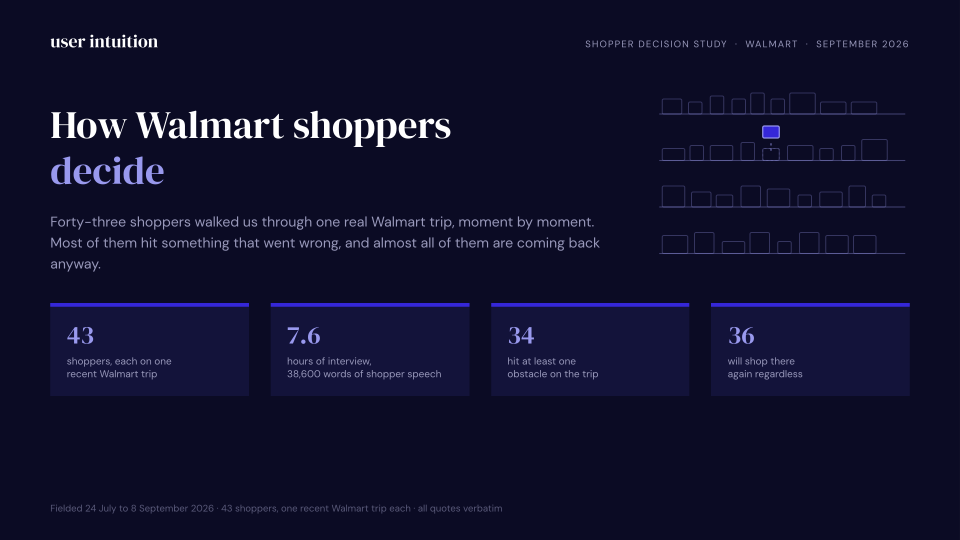
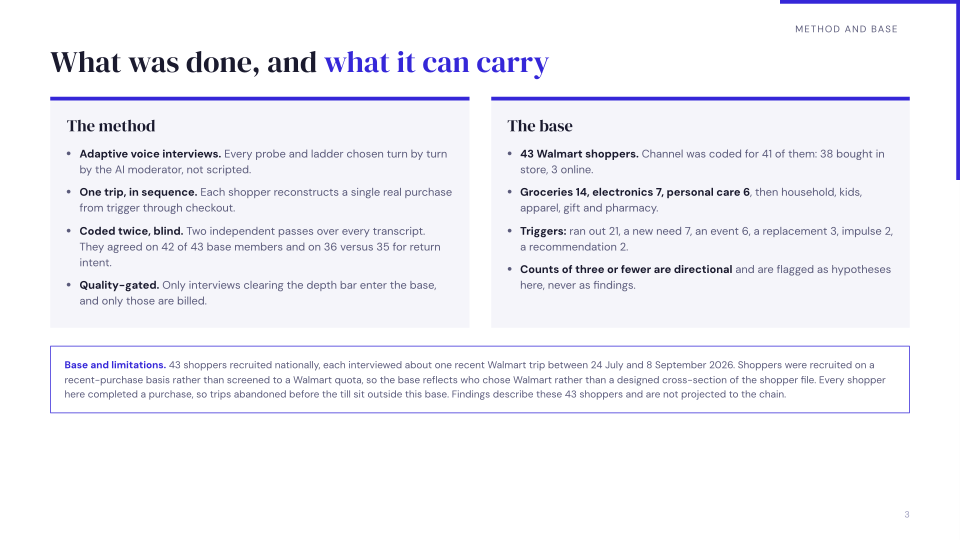
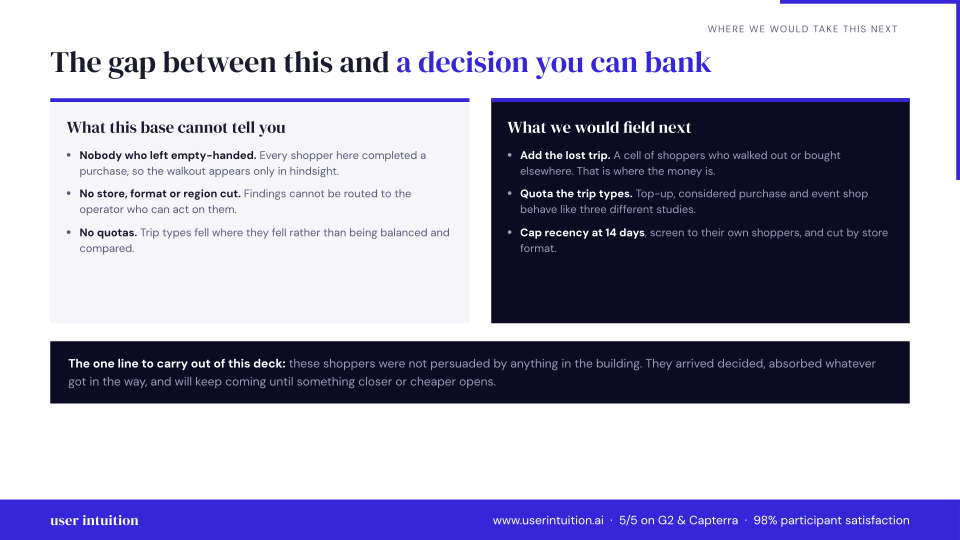
Explore calls and a sample presentation from our 43-participant Walmart shopper study.
Grocery top-up, supercenter
“Basically, because we use those things all a lot We try to always have you know, certain things in the house at all times because we use them very frequently. So we don't like to run out of them.”
What was making you want those specific things right then? Beyond just being out? Was it about being able to make certain meals or something else?
Basically, because we use those things all a lot We try to always have you know, certain things in the house at all times because we use them very frequently. So we don't like to run out of them.
Phone replacement, unplanned and urgent
“It made me feel so safe so relieved, and it brightened my day.”
Sounds like you knew exactly what you want. A Google Pixel 6 Pro. What was it about that phone that made it the right choice for you, especially in that moment?
Yeah. Thank you. So the the the phone had a lot of features. I I heard friends were talking about this phone. So in terms of the camera setting, it can take pictures and refine them into good quality. It has its own internal scanner, like I don't need to download other apps to scan to do scans. And of course, it has high quality for recording, which has been helping me in my meetings. In the office. So it's really amazing, and I love festival the quality of the phone in terms of the camera, because the previous phone I had was a Samsung. And the quality was really frustrating. And it had it has a very good processor speed as well. It's very fast. It's very efficient, and I like it. I like it. I'm enjoying the features.
Sample presentation
Preview three slides, or download the full 15-slide presentation.
Bring your own sample
$30 per quality voice interview
Use our 4M+ vetted panel
$60 per quality voice interview
What researchers say
"It's quick to set up, the AI interviews actually hold up, and everything we've ever learned is searchable in one place. That's the direction consumer insights should have gone years ago."
"I switched from SurveyMonkey to User Intuition because it allows me to collect real-time voice data from interviews, which is key for me. The initial setup was not hard at all; Charles, the AI, helped me set it up by using my parameters, and it generated everything I needed — just a bit of editing was required. It fits perfectly into our consulting workflow, as we don't do many interviews and it's cost-effective for our small team."
Frequently Asked Questions
Give Your Agent Customer Evidence
Connect your account and explore the research tools, CLI, and skills.
Works with Claude, ChatGPT, Cursor, Claude Code, VS Code, and any MCP-compatible agent.
Related resources
Pillar Guides
Deep-dive guides covering this topic from strategy to execution.
Tools & Tactics
Practical frameworks and platform-specific guides for teams ready to act.
Reference Guides
Reference deep-dives on methodology, best practices, and applied research.
Alternatives & Comparisons
Side-by-side comparisons with competing platforms and approaches.
Related Solutions
Complementary research use cases that pair with this topic.
Industries
See how teams in specific verticals apply this research.
Last updated