
See What Users Do. Hear Why They Did It.
AI-moderated walkthroughs on Figma prototypes, staging and production sites. A one-line snippet shows the moderator where users clicked and stalled, so it asks why in the moment. Panel results in 24 hours.

Walk me through the last time you made this choice. What tipped it?
The deciding reason surfaced four follow-ups deep, not in the first answer.
Trusted by teams at







A usability testing platform is software that captures how real users navigate a product or prototype — and why they get stuck. User Intuition runs AI-moderated usability walkthroughs on Figma prototypes, live URLs, or any web product, with the AI moderator asking follow-up questions in real time as participants click, hesitate, or rage-quit. On builds you control, a User Intuition session snippet gives the moderator element-level detail: which control was clicked, where the mouse moved, and where the participant stalled. Unmoderated tools log behavior but skip the reasoning; moderated platforms add a human observer but require recruiting and scheduling. User Intuition captures both behavior and reasoning in a single session — starting at $30 per quality interview, with results in 24 hours from a 4M+ vetted panel across 58 countries, interviewing in 80+ languages. The output is practical: a navigable session record with spoken commentary aligned to each interaction, friction patterns across participants, and the specific moments where mental models diverged from the product's design intent.
What is usability testing with User Intuition?
Usability testing with User Intuition puts real participants on your Figma prototype, staging or production site while an AI moderator asks why at the moment they hesitate. On builds you control, a one-line session snippet tells the moderator which element was clicked and where the participant stalled, and every session returns a recording. Run 200+ panel sessions in 24 hours from a 4M+ vetted panel across 58 countries, or bring your own users, whose sessions run in parallel as they respond.
Who is usability testing with User Intuition for?
Research and UX agencies testing client products at sprint cadence, and in-house product, design and UX research teams who need the reasoning behind each click.
How does AI-moderated usability testing work?
Share a Figma prototype link or live URL, with no plugin or special export needed. Participants navigate on their own desktop while the AI moderator asks follow-up questions in real time, in voice, or in video if you want to see their face.
What do you get from a usability test?
A navigable recording with spoken commentary aligned to each interaction, friction patterns across participants, the element-level click path on snippet-enabled builds, and an editable presentation.
Why does unmoderated usability testing miss the why?
Unmoderated tools log clicks without reasoning; moderated sessions need scheduling most teams can't sustain at sprint cadence. Here's what UX researchers tell us, and how User Intuition closes each gap.
- Sound familiar?
Maze shows us where people dropped off. Nobody can tell me why they ignored the button.
Real-time AI follow-up on every hesitation
The moderator asks about a hesitation, backtrack or rage click while it's still fresh, capturing behavior and reasoning in the same session, which unmoderated tools like Maze, Sprig, Hotjar and UserTesting's unmoderated tier never record.
- Sound familiar?
Every moderated session means two weeks of calendar wrangling, so we default to unmoderated.
Moderated usability testing without scheduling
Participants join on their own time, with none of the calendar coordination or per-session contracts of Lookback, Userlytics or UserTesting's moderated tier, and panel results arrive in 24 hours.
- Sound familiar?
We keep testing with the same customer panel, and they've learned every workaround.
Outside users, real mental models
Sessions go to participants who don't already know your product, screened to your target profile and recruited from a 4M+ vetted panel in 80+ languages, so you test against the mental models of your next users, not people who have learned the workarounds.
- Sound familiar?
The synthetic users breezed through the flow. Real customers got stuck on step two.
Real participants, not simulated users
Every session is a real person on their own device and in their own context, and the recording shows they engaged, so the friction you find is friction that exists in production.
From Prototype to Friction Patterns in 4 Steps
Paste a Figma link or live URL, define tasks, and get behavior-plus-reasoning evidence, with panel results in 24 hours.
Connect Your Prototype or URL
Paste a Figma prototype link or live URL. Define the tasks you want tested. Select your target audience from a 4M+ vetted global panel — by role, segment, behavior, or geography. Bring your own guide, or the AI builds the screener and walkthrough script automatically.
Participants Walk Through Live
Real users join on their own time and navigate your product naturally. The AI moderator asks follow-up questions in real time as they click, hesitate, or comment — capturing reasoning at the moment of friction.
Behavior + Reasoning Captured
Each session returns a navigable recording with spoken commentary aligned to the moment it was said, plus AI-extracted friction tags. Sessions running the snippet add the element-level click path. Cross-session analysis surfaces where multiple users hit the same wall.
Friction Patterns in the Intelligence Hub
Findings feed your Customer Intelligence Hub — searchable across sessions, with cross-test friction patterns and mental-model gaps surfacing as the catalog grows.
Test Any Digital Product Surface
Real users walk through Figma prototypes, live URLs, or web products — the AI asks why in real time so you get behavior and reasoning in one session.
Figma Prototype Walkthroughs
Paste a Figma prototype link and participants navigate it on their own device while the AI moderator asks why in real time. Classic prototypes run on Figma's player and capture click and page-visibility signal; Figma Make compiles to code and takes the session snippet.
Live URL Walkthroughs
Test production sites, staging environments, or any URL-accessible web product. Participants navigate naturally; the AI captures behavior and reasoning across the actual user environment.
Real-Time AI Follow-up
Unlike unmoderated tools, the AI moderator asks follow-up questions as users interact — what they expected, why they hesitated, what the label suggested. Reasoning captured at the moment of friction, not reconstructed afterward.
Real Participant Environment
Sessions run on the participant's own desktop, in their own environment — not a lab setting. Captures the real-world distractions, multitasking, and context that controlled environments hide.
Element-Level Clickstream
Add the User Intuition snippet at setup and the moderator follows the session live: which element was clicked, where the mouse moved, what was scrolled past, where the participant stalled. Follow-up questions land on the exact control that caused the friction, not a vague recollection.
Sites That Block Embedding
Banks, publishers, and most logged-in products send headers that stop third-party tools embedding them. User Intuition runs those as recorded walkthroughs on the real production site, so the study happens against the product users use.
Real-Time AI Follow-up Methodology
Most usability testing tools either log clicks (unmoderated) or require human observers (scheduled). User Intuition combines real-time AI follow-up with a vetted human panel — capturing behavior and reasoning in a single session, at sprint cadence.
How User Intuition Runs Walkthroughs
- Real-time AI follow-up — asks why during interaction, not after
- Navigable session recordings with spoken commentary, plus element-level click path on snippet-enabled builds
- Friction-pattern detection across participants — where multiple users hit the same wall
- Mental-model gap surfacing — where design intent diverged from user expectation
- Cross-session analysis in the Customer Intelligence Hub — patterns over time
- Real participant environment — own desktop, own context, not a controlled lab setting
Built-In Quality Controls
- Panelists vetted and tracked longitudinally; every session screened for AI-generated or coached answers
- Attention and engagement monitoring throughout every session
- Professional respondent filtering across all panel sources
- Evidence trails for every friction finding — cite the exact moment
- Methodology transparency: see why the AI asked each follow-up
- GDPR & CCPA compliant; customer data is never used to train AI models
Methodology validated across 30,000+ AI-moderated sessions. Real-time follow-up — not a survey after the session ends.
What can teams run with interactive walkthroughs?
Apply AI-moderated usability testing across UX, product, and innovation decisions.
User Research
Test prototypes and capture friction at sprint cadence.
→Product Innovation
Validate new product surfaces with real-user reasoning.
→UX Researchers
Replace unmoderated tools with moderated AI walkthroughs.
→Product Teams
Ship features after watching users navigate them.
→Software & SaaS
Test signup flows, dashboards, and feature releases.
→Concept Tests
Show static or video stimulus instead of interactive prototypes.
→Why researchers choose User Intuition
User Intuition is an AI-moderated interview platform that gives research teams and agencies the depth of a senior researcher at the scale of a survey, with vetted respondents, your own methodology and evidence you can trace to the verbatim. Quality is built in: a person vets every panelist by hand, every session is screened for fraud, and you pay only for interviews that pass.
Senior-researcher depth
The moderator ladders 5–7 levels deep by default, using Reynolds and Gutman's laddering method, so you hear the reasons behind the reasons.
Your methodology, run as written
Bring your discussion guide and frameworks. Required questions stay pinned in order, word for word if you need it, study rules keep the moderator inside your compliance lines, screeners and hard quotas fill every cell to plan, and you decide how far it probes.
Every finding traces to its source
Click any theme through to the verbatim, the transcript and the recording. Every claim in the deliverable traces to what a participant said.
Respondents you can stand behind
A 4M+ vetted panel across 58 countries: a person listens to every panelist's interviews before they're accepted, then every session is screened for AI-generated or coached answers and panelists are tracked across studies. Or bring your own: customer lists, your panel provider, or respondents straight from your survey.
Deliverables ready to present
Themes, verbatims and an editable presentation for every study, plus every transcript, recording and screener answer to export into your own tools. Put your own brand on them when you need to.
Survey scale, quality-only billing
200+ panel interviews in 24 hours, with no cap on parallel conversations. Each one is scored on length, depth and coverage, and you pay only for those that pass.
- Isolated workspaces
- Confidential stimulus
- Never used to train AI models
- GDPR & CCPA compliant
- SOC 2 Type II examination underway
- Security →
How does User Intuition compare to Maze and UserTesting?
User Intuition pricing is the current self-serve rate; subscription options are on /pricing/.
| Dimension | User Intuition | Maze | UserTesting |
|---|---|---|---|
| Methodology | AI-moderated walkthroughs with real-time follow-up | Unmoderated task-based testing | Mix: unmoderated + moderated humans |
| Turnaround | 24 hours for panel studies | Hours (unmoderated only) | Days-weeks (moderated) |
| Real-time follow-up | AI asks why during clicks | None — preset task prompts only | Only in moderated sessions |
| Behavioral instrumentation | Element-level clickstream with the snippet, live to the moderator | Click paths, reviewed after the session | Screen recording only |
| Recruiting | Built-in 4M+ vetted panel | BYO panel or partner add-on | Their panel (US/UK-leaning) |
| Best for | Diagnostic + reasoning at scale | Quant click-path data | Enterprise contracts + brand-validated panels |
Hear the interviews. See the presentation.
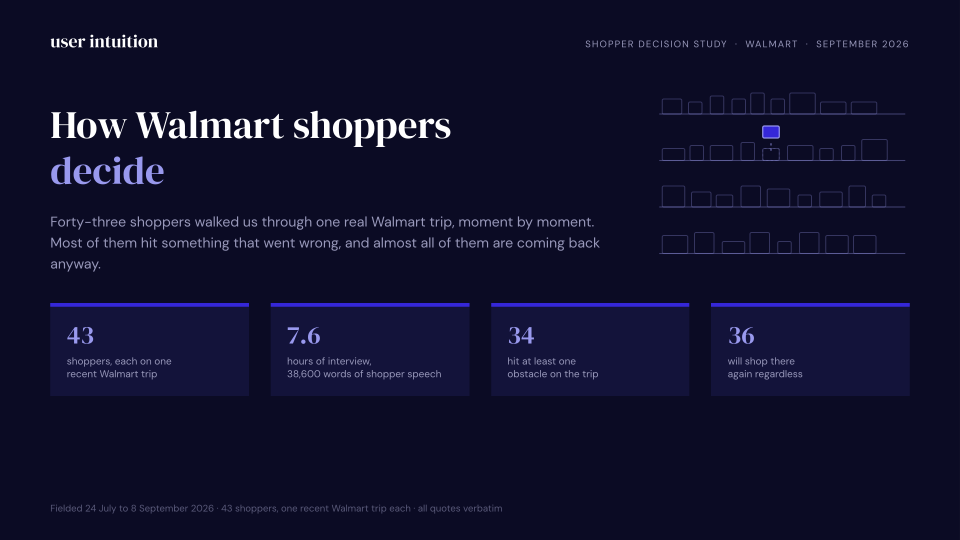
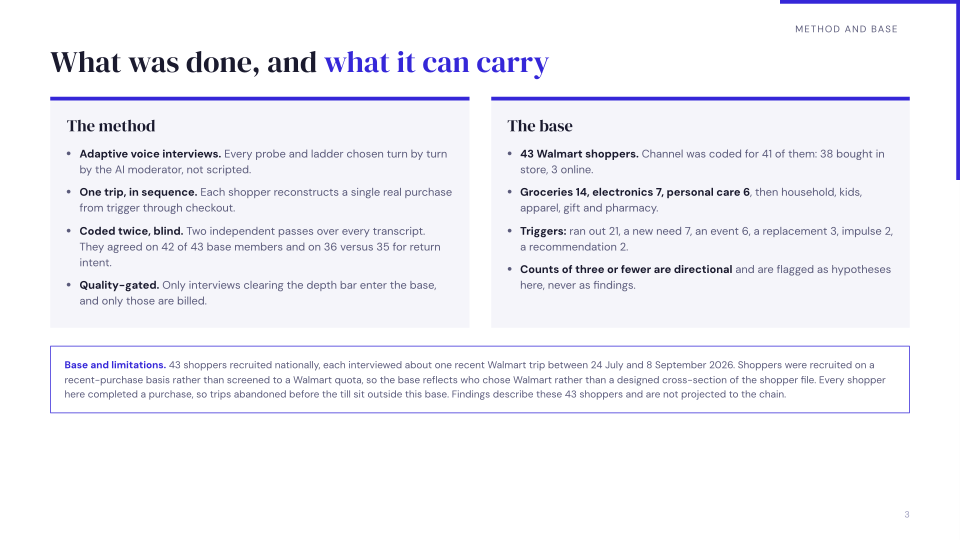
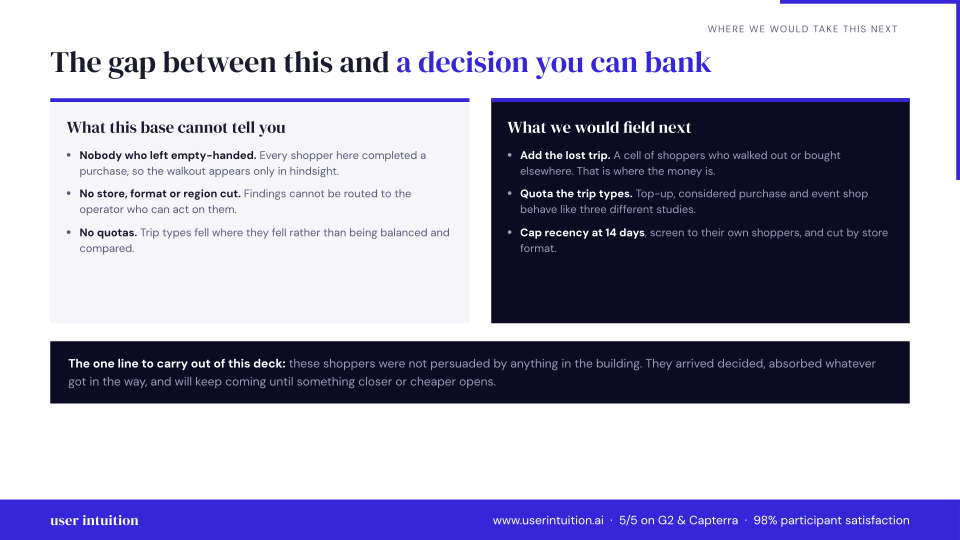
Explore calls and a sample presentation from our 43-participant Walmart shopper study.
Grocery top-up, supercenter
“Basically, because we use those things all a lot We try to always have you know, certain things in the house at all times because we use them very frequently. So we don't like to run out of them.”
What was making you want those specific things right then? Beyond just being out? Was it about being able to make certain meals or something else?
Basically, because we use those things all a lot We try to always have you know, certain things in the house at all times because we use them very frequently. So we don't like to run out of them.
Phone replacement, unplanned and urgent
“It made me feel so safe so relieved, and it brightened my day.”
Sounds like you knew exactly what you want. A Google Pixel 6 Pro. What was it about that phone that made it the right choice for you, especially in that moment?
Yeah. Thank you. So the the the phone had a lot of features. I I heard friends were talking about this phone. So in terms of the camera setting, it can take pictures and refine them into good quality. It has its own internal scanner, like I don't need to download other apps to scan to do scans. And of course, it has high quality for recording, which has been helping me in my meetings. In the office. So it's really amazing, and I love festival the quality of the phone in terms of the camera, because the previous phone I had was a Samsung. And the quality was really frustrating. And it had it has a very good processor speed as well. It's very fast. It's very efficient, and I like it. I like it. I'm enjoying the features.
Sample presentation
Preview three slides, or download the full 15-slide presentation.
Bring your own sample
$30 per quality voice interview
Use our 4M+ vetted panel
$60 per quality voice interview
What researchers say
"We ended up testing four screens and a concept image for a shared-lists idea that design was falling in love with. Fourteen video interviews later, we paused the build and saved a sprint on something people didn't connect with."
"I still use quick unmoderated tests for task metrics. User Intuition is better for understanding the reasons behind those metrics. Using both made the redesign much easier to defend."
Frequently Asked Questions
Watch Real Users Walk Through Your Product
Book a demo to see an interactive walkthrough in action, or start free with 3 sessions. Panel recruiting is billed separately.
No recruiting. No scheduling. No observation lab. Just real users, real reasoning, panel results in 24 hours.
Related resources
Pillar Guides
Deep-dive guides covering this topic from strategy to execution.
Tools & Tactics
Practical frameworks and platform-specific guides for teams ready to act.
Reference Guides
Reference deep-dives on methodology, best practices, and applied research.
Alternatives & Comparisons
Side-by-side comparisons with competing platforms and approaches.
Related Solutions
Complementary research use cases that pair with this topic.
Last updated